
Migration Configuration Missing Parameters
Troubleshooting when required configuration values are missing in the Opsole Admin Portal during pre-migration validation (~10%).
Description
During pre-migration validation, the application checks whether all required configuration values are available from the Opsole Admin Portal.
This error occurs when one or more mandatory configuration parameters are missing or incomplete.
This validation happens before migration begins. No device changes are performed at this stage.
Quick Reference
| Item | Details |
|---|---|
| Stage | Pre-Migration configuration validation |
| Progress | Around 10% |
| Device impact | No device migration changes have been made |
| Safe to retry | Yes |
| Responsibility | Customer IT administrator |
What You Will See
Application Message
Migration configuration is missing parameters, Please update and try again.
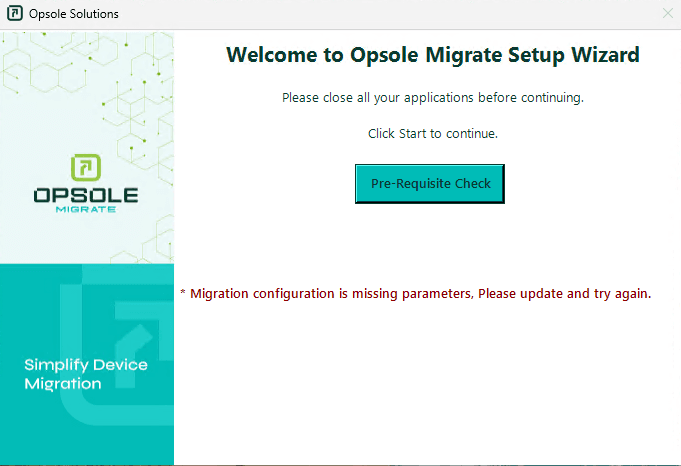
Portal Log
Migration failed in module ConfigurationValidation
Root Cause
Required configuration values are missing or incomplete in the assigned migration configuration.
Common causes:
- Source tenant details not configured
- Target tenant details missing for cross-tenant migration
- Domain leave credentials not provided
- BitLocker configuration not defined
- Incorrect or incomplete configuration assigned to the device
Diagnosis
Review the migration configuration in the Opsole Admin Portal and confirm the following:
- Source tenant name is configured
- Target tenant name is configured (if applicable)
- Domain leave username is provided
- Domain leave password is provided
- BitLocker setting is defined
- Correct configuration is assigned to the device
Resolution
Missing Configuration Values
Update all required fields in the Opsole Admin Portal configuration.
After updating the configuration, retry the migration.
Recovery Steps
- Close the Opsole Migrate application
- Re-open the application
- Start migration again
When to Contact Support
Contact support@opsole.com if:
- Configuration appears complete but the error persists
- Multiple devices show the same issue unexpectedly
Related Logs
- Event Viewer → Application and Services Logs → OpsoleMigrate
How is this guide?