
API Endpoint or Configuration Retrieval Failed
Troubleshooting when the device cannot connect to the Opsole API or retrieve migration configuration during pre-migration validation (1%–20%).
Description
Before migration begins, the application validates connectivity to the Opsole management service and retrieves the required migration configuration.
This error occurs when the device is unable to establish a successful connection to the Opsole API or fails to retrieve configuration data.
This validation happens during the initial phase of migration. No device changes are performed at this stage.
Quick Reference
| Item | Details |
|---|---|
| Stage | Pre-Migration API validation and configuration retrieval |
| Progress | 1% to 20% |
| Device impact | No device migration changes have been made |
| Safe to retry | Yes |
| Responsibility | Customer IT or network administrator |
What You Will See
Application Message
Failed to connect to the API Endpoint. Contact IT department.
Failed to connect to the API Server. Please contact your IT Support.
Failed to retrieve configuration from management service.
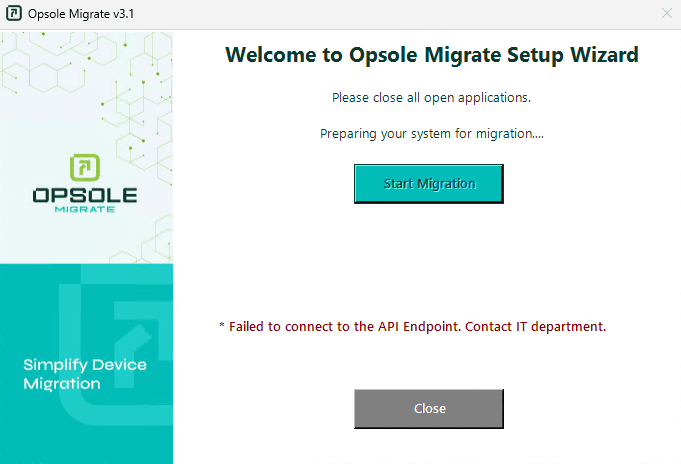
Portal Log
Migration failed in module Getconfigapi
Root Cause
The device is unable to establish a successful HTTPS connection to the Opsole API or retrieve configuration data.
Common causes:
- No internet or VPN connectivity
- DNS resolution failure for the API domain
- Firewall, proxy, or web filtering blocking outbound HTTPS traffic
- SSL inspection interrupting secure communication
- Temporary unavailability of the Opsole API service
Diagnosis
Run the following checks in PowerShell (Administrator). Stop at the first failure.
# Step 1 - Check internet connectivity
Test-NetConnection -ComputerName "8.8.8.8" -Port 443

# Step 2 - Check DNS resolution
Resolve-DnsName -Name "api.opsole.com"

# Step 3 - Check HTTPS connectivity
Test-NetConnection -ComputerName "api.opsole.com" -Port 443

# Step 4 - Check proxy configuration
netsh winhttp show proxy| Check | Failure Indicates |
|---|---|
| Step 1 | No internet connectivity |
| Step 2 | DNS resolution issue |
| Step 3 | Firewall, proxy, SSL inspection, or web filtering blocking |
| Step 4 | Proxy configuration impacting connectivity |
| All pass | API availability issue or restrictive network policy |
Resolution
No Internet or VPN Connectivity
Connect to a stable internet connection or corporate VPN, then retry.
DNS Resolution Failure
ipconfig /flushdns
Resolve-DnsName -Name "api.opsole.com"
If unresolved, update DNS configuration to allow resolution of the API domain.
Firewall / Proxy / Web Filtering
- Allow outbound HTTPS (TCP 443) to the Opsole API domain
- Ensure proxy does not require interactive authentication
- Confirm no filtering policies are blocking the request
SSL Inspection
Ensure SSL inspection is not interrupting HTTPS communication to the API domain.
API Service Availability
If all checks pass:
- Wait a few minutes and retry
- Verify if multiple devices are affected
Recovery Steps
- Close the Opsole Migrate application
- Re-open the application
- Start migration again
When to Contact Support
Contact support@opsole.com if:
- All checks pass but the issue persists
- Multiple devices fail simultaneously
- The portal does not receive logs from the device
Related Logs
- Event Viewer → Application and Services Logs → OpsoleMigrate
How is this guide?