
Domain Leave Failed
Troubleshooting when the device cannot be removed from the Active Directory domain during pre-migration (~50%–60%).
Description
During pre-migration, the application attempts to remove the device from the Active Directory domain.
The standard method uses configured domain credentials when connectivity to a domain controller is available. If this is not available, a forced offline removal is attempted.
This error occurs when both methods fail.
At this stage, earlier preparation steps may already have been completed, such as device management cleanup, SCCM removal, or Entra disconnect.
Quick Reference
| Item | Details |
|---|---|
| Stage | Pre-Migration domain leave |
| Progress | Around 50% to 60% |
| Device impact | Device may be in a partial migration state |
| Safe to retry | No |
| Responsibility | Customer IT administrator |
What You Will See
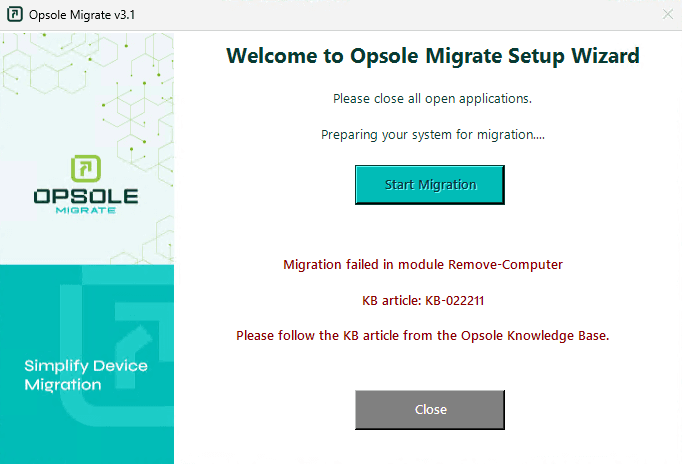
Application Message
Migration failed in module Remove-Computer
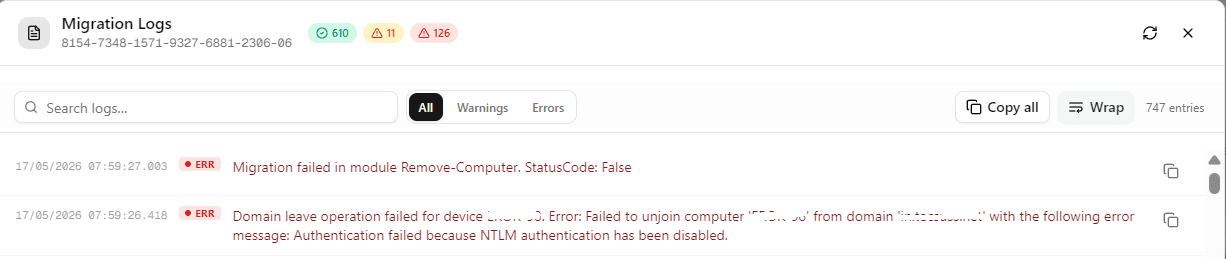
Portal Log
Migration failed in module Remove-Computer
Root Cause
The device is unable to leave the Active Directory domain.
Common causes:
- Domain leave credentials are incorrect, expired, locked, or disabled
- Domain leave account lacks permission to unjoin devices
- Security policy or endpoint protection blocking execution
- Broken or inconsistent domain trust state
Diagnosis
Run the following checks in PowerShell (Administrator):
Step 1 – Check domain join state
(Get-CimInstance Win32_ComputerSystem).PartOfDomain
Step 2 – Check configured domain name
Get-ItemPropertyValue "HKLM:\SYSTEM\CurrentControlSet\Services\Tcpip\Parameters" -Name "Domain"
Step 3 – Check domain controller discovery
$domain = Get-ItemPropertyValue "HKLM:\SYSTEM\CurrentControlSet\Services\Tcpip\Parameters" -Name "Domain"
Resolve-DnsName -Type SRV "_ldap._tcp.dc._msdcs.$domain"
| Result | Meaning |
|---|---|
| Domain state is False | Device already left the domain |
| Domain controller lookup fails | DNS or network issue |
| Domain reachable but leave fails | Credential, permission, or trust issue |
Resolution
Credential Issue
Update domain leave credentials in the Opsole Admin Portal with a valid account that has permission to unjoin computers.
Security Blocking
Allow domain removal operations and ensure endpoint security tools are not blocking the process.
Device Already Left Domain
Do not attempt to rejoin the domain without validation. Proceed based on the current device state.
Recovery Steps
This is a partial migration state. Do not retry repeatedly.
Customer IT must confirm:
- Current domain join state
- Whether Entra leave has completed
- Whether device management cleanup has completed
- Availability of local administrator access
After validation, rerun the migration.
When to Contact Support
Contact support@opsole.com if:
- Domain leave fails even with valid credentials
- Device state is unclear or inconsistent
- Multiple devices show the same failure
Related Logs
- Event Viewer → Application and Services Logs → OpsoleMigrate
How is this guide?