
No Valid License Available
Troubleshooting when the tenant does not have an available migration license during pre-migration validation (~5%).
Description
During migration initiation, the application validates license availability with the Opsole management service.
This error occurs when the device successfully connects to the service, but no valid or available migration license is assigned to the tenant.
This validation happens early in the migration process. No device changes are performed at this stage.
Quick Reference
| Item | Details |
|---|---|
| Stage | Pre-Migration license validation |
| Progress | Around 5% |
| Device impact | No device migration changes have been made |
| Safe to retry | Yes |
| Responsibility | Customer IT administrator |
What You Will See
Application Message
No valid license available. Please contact your IT Support.
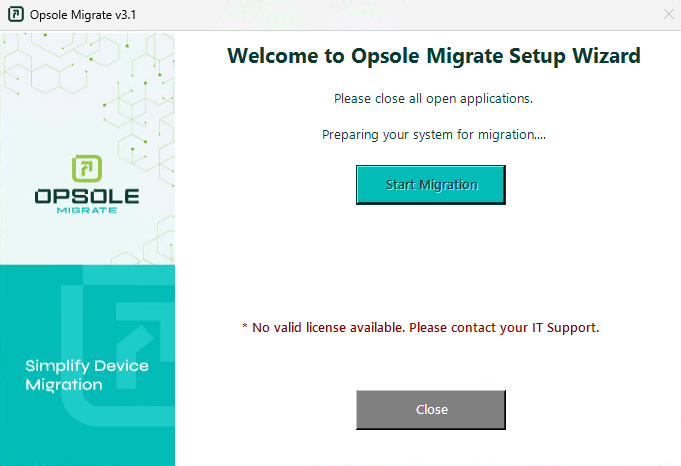
Portal Log
Migration failed in module LicenseValidation
Root Cause
The tenant does not have an available or valid license assigned for the migration.
Common causes:
- All purchased migration licenses are already consumed
- Licenses are not yet activated or assigned
- Device is associated with an incorrect tenant or configuration
- License allocation has not been completed for the migration batch
Diagnosis
Verify the following in the Opsole Admin Portal:
- Confirm active migration licenses are present
- Verify at least one license is available
- Check the device is mapped to the correct tenant
- Ensure the correct migration configuration or deployment package is used
Resolution
No Licenses Available
Allocate or purchase additional migration licenses, then retry.
License Not Activated or Assigned
Wait for license activation or complete assignment in the portal, then retry.
Incorrect Tenant or Configuration
Ensure the device is using the correct tenant configuration and deployment package.
Recovery Steps
- Close the Opsole Migrate application
- Re-open the application
- Start migration again
When to Contact Support
Contact support@opsole.com if:
- Licenses are available in the portal but the error persists
- Multiple devices report the same issue unexpectedly
- License allocation appears correct but validation fails
Related Logs
- Event Viewer → Application and Services Logs → OpsoleMigrate
How is this guide?