
AD Disjoin Account Preparation
Create and delegate the Active Directory account used to disjoin AD-joined or Hybrid-joined devices, validate permissions, and prepare for portal configuration.
AD Disjoin Account Preparation
2.5 Active Directory Device Disjoin Account Preparation
Opsole Migrate requires a delegated Active Directory account when a device must be removed from a source Active Directory domain during migration.
| Migration scenario | AD disjoin account required |
|---|---|
| AD-to-Entra | Required |
| Hybrid-to-Entra | Required |
| Tenant-to-Tenant from AD-joined or Hybrid-joined source devices | Required |
| Tenant-to-Tenant from Entra ID joined source devices only | Not required |
This account is used by the Opsole Migrate agent to perform the domain disjoin operation before the device is registered into Microsoft Entra ID.
For cross-forest scenarios, prepare and validate the disjoin account in the source AD forest where the device is currently joined.
Account Security Requirements
Use a dedicated standard user account for domain disjoin operations. Do not use Domain Admin credentials unless explicitly approved by your AD and security teams.
Recommended controls:
- Use a clear naming convention, for example
svc-opsole-disjoin. - Delegate access only to OUs containing devices in migration scope.
- Store the password in an approved secrets vault or privileged access management system.
- Monitor password expiry, account lockout, and failed logon events during pilot migration.
- Confirm the account can authenticate for domain disjoin operations from target devices. Interactive sign-in should not be required unless your organization uses it for validation.
- Configure the account in the Opsole Migrate portal using the format
DOMAIN\username.
If NTLM is disabled or restricted by GPO, security baseline, or endpoint hardening policy, validate domain disjoin behavior before production migration.
Step 1 - Create Delegated AD Account
- On a domain controller or management workstation, open Active Directory Users and Computers (
dsa.msc). - Create a new dedicated standard user account in the source Active Directory environment.
- Set a strong password for the account.
- Confirm the account is not affected by GPOs or security policies that would prevent authentication for domain disjoin operations.
- Confirm the account is not expired, disabled, locked out, or restricted from authenticating from target devices.
Step 2 - Delegate Control to the Computers OU
- In Active Directory Users and Computers, navigate to the OU that contains the computers targeted for migration.
- Right-click the OU and select Delegate Control....
- In the Delegation of Control Wizard, select the user account created in Step 1 and click Next.
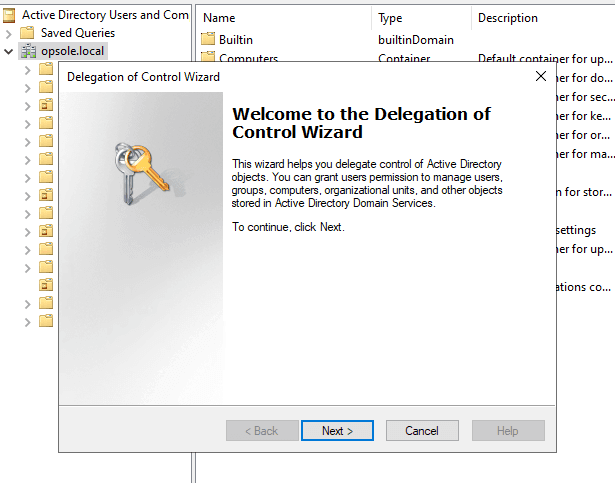
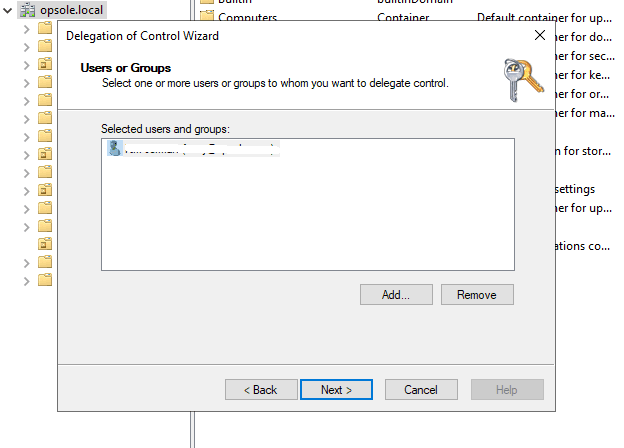
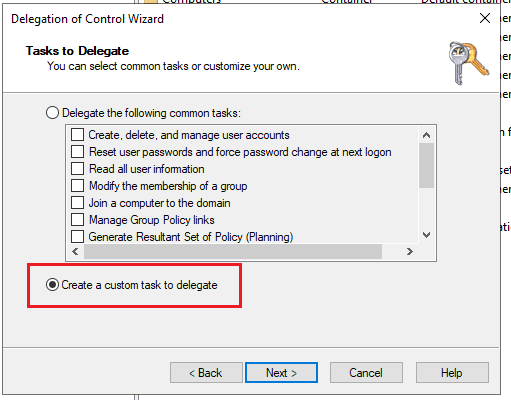
- On the Tasks to Delegate screen:
- Choose Create a custom task to delegate.
- Click Next.
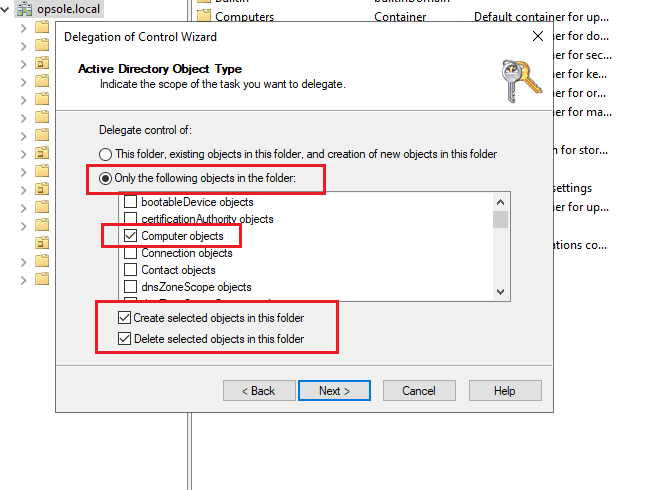
- In the Active Directory Object Type window:
- Select Only the following objects in the folder.
- Check Computer objects.
- Check Create selected objects in this folder.
- Check Delete selected objects in this folder.
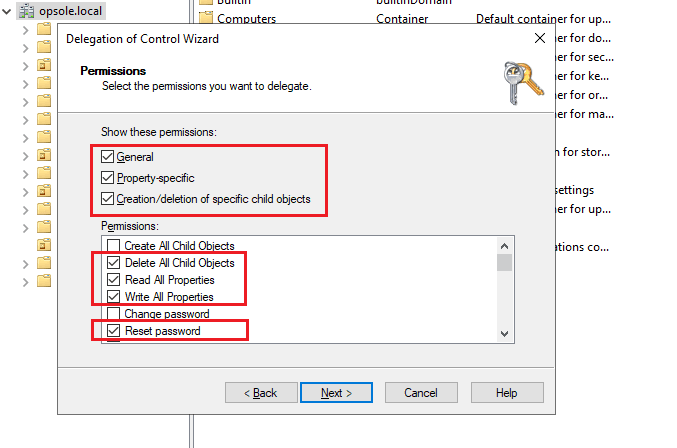
- In the Permissions window:
- Select General.
- Select Property-specific.
- Select Creation/deletion of specific child objects.
- Under Permissions, check:
- Delete All Child Objects
- Read All Properties
- Write All Properties
- Reset Password
- Click Next, review your settings, and click Finish to complete the delegation.
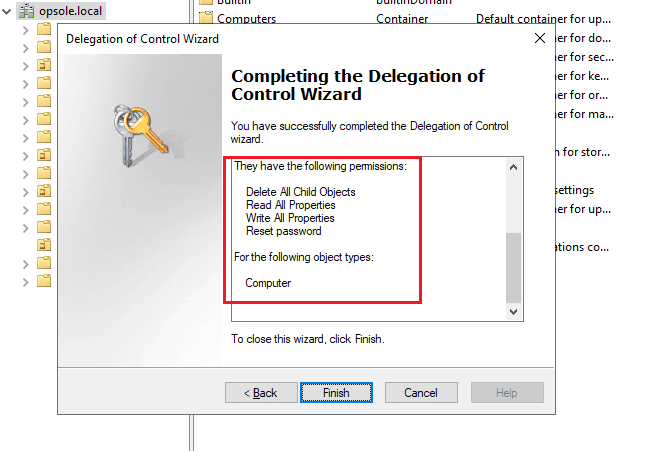
The user account now has the required delegated rights to disjoin computer objects from Active Directory within the selected OU scope.
Delegate permissions at the lowest OU level that contains the target devices. Do not delegate permissions at the domain root unless approved by the AD and security teams.
If target devices are spread across multiple OUs, repeat delegation for each OU or apply delegation at the lowest common parent OU approved by the AD and security teams.
2.6 Validate the Disjoin Account
Before using the Active Directory disjoin account in migration activities, validate the account on a test machine in the same OU structure as production target devices.
This validation confirms that the account is correctly configured and reduces the risk of domain disjoin failures during migration.
Step 1 - Prepare a Test Machine
- Build or select a test machine joined to the source Active Directory domain.
- Place the test computer object in the same OU, or equivalent delegated OU, as production migration devices.
- Confirm the test machine can reach a domain controller.
- Confirm the disjoin account is active, unlocked, and has a valid password.
Step 2 - Disjoin the Machine Using the Prepared Account
- Sign in to the test machine using an administrative account.
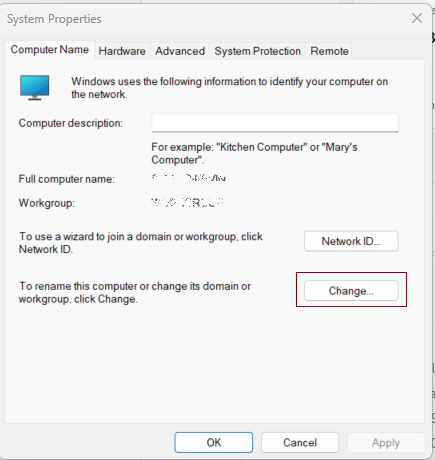
- Open System Properties.
- Click Change next to the computer name.
- Select Workgroup.
- Click OK.
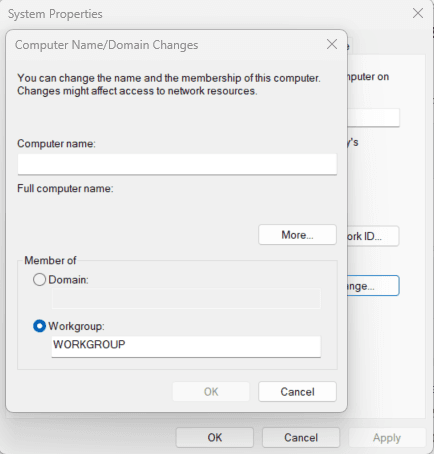
- When prompted, enter the credentials of the prepared disjoin account.
Step 3 - Confirm Validation Success
Successful validation confirms that:
- The test device can be removed from the source Active Directory domain.
- The delegated disjoin account can authenticate from target devices.
- OU permissions are sufficient for devices in the migration scope.
- The account does not lock out during validation.
- Domain controller connectivity and local security policy allow the operation.
If validation fails, do not proceed with production migration. Review:
- OU delegation scope and inherited permissions
- Account status, password expiry, and account lockout
- Credential format, including
DOMAIN\username - Domain controller reachability from test devices
- GPO, security baseline, or endpoint hardening restrictions
- NTLM restrictions or disabled NTLM authentication
- EDR/AV controls that may block domain disjoin operations
Next Steps
- Continue to setup: Portal Configuration
How is this guide?